
Blog
LMS Integration with Salesforce: How to Connect Training Without a Nightly Sync
Learn how LMS integration with Salesforce works, which architecture eliminates nightly syncs, and how to evaluate AppExchange LMS apps before you commit.

Plan your LMS migration step by step: week-by-week project plan, data mapping matrix, UAT checklist, and a multi-region rollout template. Updated 2026.

Learn how LMS integration with Salesforce works, which architecture eliminates nightly syncs, and how to evaluate AppExchange LMS apps before you commit.

Learn how retail chains use a Learning Management System to train frontline staff on new products and promotions by location, even with high turnover.

Learn how a partner training LMS keeps distributors, vendors, customers, and contractors in separate branded portals with isolated reports and certifications.
Request a quote and our experts will contact you within 24 hours with tailored solutions and pricing.
You can also send us a quick email at sales@maplelms.com.
MapleLMS
Last updated: Oct 12, 2026
By Surbhi Bhatia, Content Coordinator, MapleLMS - Surbhi covers learning technology strategy at MapleLMS, working alongside the implementation team on enterprise migration and Salesforce integration projects.
Learning Management System (LMS) migration is the structured process of transferring an organization's learner profiles, completion records, certifications, and compliance data from one LMS to another - and for large enterprises, it typically takes 6 to 12 months of careful planning.
Your LMS contract ends next year. That deadline is closer than it feels. Enterprise buyers collectively spent an estimated USD $4.2 billion on LMS migration projects in 2024 alone (Market Research Future, 2026). Most teams underestimate the complexity and pay for it later.
This guide gives you a complete LMS migration project plan: a week-by-week template you can adapt for a multi-region rollout, a data mapping matrix, a user acceptance testing checklist, and a post-migration monitoring framework. Whether you are moving 500 learners or 150,000, every phase is covered here.
Key Takeaways
- LMS migration is a six-phase project covering discovery, data mapping, configuration, piloting, user acceptance testing, and cutover - each phase requires named owners and exit criteria.
- Enterprise organizations with 5,000+ learners need 6 to 12 months; organizations with fewer than 500 learners need 2 to 3 months (Konstantly, 2026). Start planning when a renewal decision is on the table.
- 52% of LMS users cite poor HRIS and CRM integration as their top dissatisfaction driver (Sci-Tech-Today, 2026), making LMS migration a strategic business decision, not just an IT task.
- The data mapping phase is where most enterprise migrations lose time. A field-level mapping document is non-negotiable before any data transfer begins.
- Multi-region rollouts require four additional planning layers: data-sovereignty compliance, localization, time-zone-sensitive cutover windows, and region-specific learner communications.
- Post-migration monitoring at 30, 60, and 90 days - with pre-agreed escalation thresholds - prevents compliance gaps from developing undetected after go-live.
In this guide:
LMS migration is the structured process of transferring an organization's learner profiles, completion records, certifications, compliance data, and learning content from one Learning Management System (LMS) to another. It requires data export, field mapping, content conversion, configuration, testing, and a managed cutover. Brandon Hall Group (2024) found that 44% of organizations plan to replace their LMS within two years, with 87% citing poor user experience as the top driver.

A migration differs fundamentally from a greenfield implementation. When you start fresh, you build clean. When you migrate, every historical completion record, certification date, and compliance timestamp must arrive in the new system intact and in the correct format. That distinction shapes every decision in the project plan.
The data objects most commonly migrated include:
Missing even one category can create an audit gap, a compliance exposure, or a learner experience failure on day one.
Organizations are replacing their Learning Management System because existing platforms no longer connect to the HR and CRM tools that run the business. A 2026 survey aggregated by Sci-Tech-Today found that 52% of LMS users cite lack of seamless HRIS and CRM integration as their top dissatisfaction point, and 37% are actively planning a replacement. Enterprise buyers collectively spent an estimated USD $4.2 billion on LMS migration projects in 2024 alone (Market Research Future, 2026).
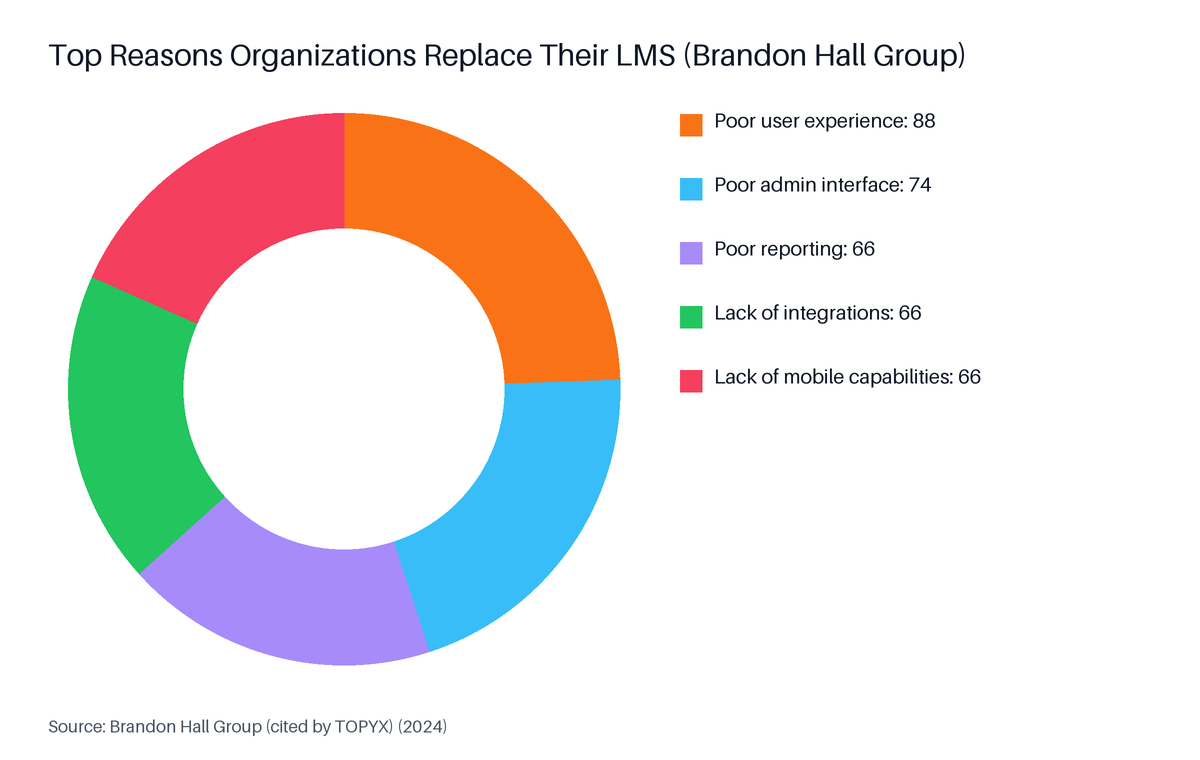
Source: Brandon Hall Group (cited by TOPYX), 2024
Brandon Hall Group's research sharpens the picture. Among organizations planning to replace their LMS, 88% cite poor user experience, 74% cite a poor admin interface, and 66% each cite poor reporting, lack of integrations, and lack of mobile capabilities (Brandon Hall Group, 2024). These are majority complaints, not edge cases.
The market data reinforces the urgency. The global LMS market reached USD $28.6 billion in 2025 and is projected to reach $123.8 billion by 2033 at a 20.2% compound annual growth rate (Grand View Research, 2026). Corporate LMS adoption grew 24% throughout 2024, and mobile LMS usage grew 45% in corporate contexts that same year (eSkilled, 2026). Platforms that cannot serve a mobile-first, integration-ready workforce are being replaced.
Organizations rarely migrate impulsively. The decision is usually driven by one of these conditions:
LMS migration timelines scale with learner count and data complexity. Practitioner benchmarks from Konstantly (2026) show that small organizations with fewer than 500 users complete migrations in 2 to 3 months. Large enterprises with more than 5,000 users typically need 6 to 12 months. Mid-size organizations in the 500 to 5,000 learner range fall in roughly a 4-month window. Planning should begin the moment a contract renewal decision is on the table.
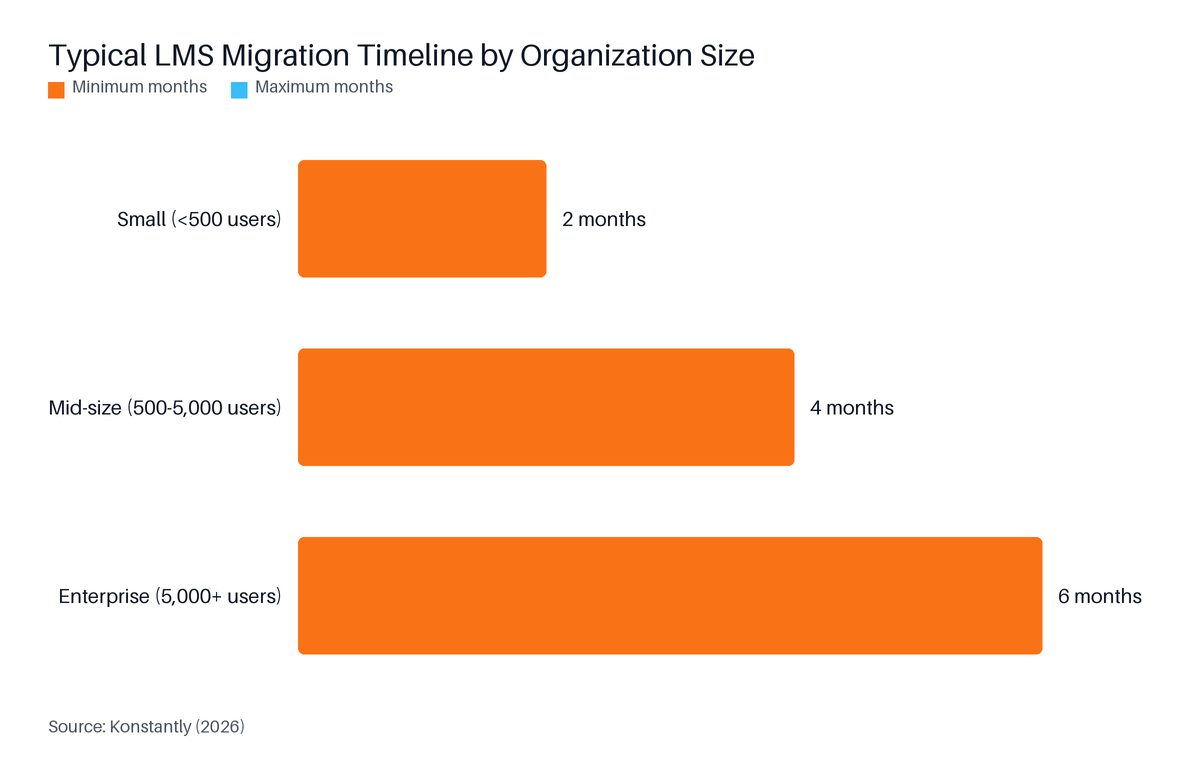
Source: Konstantly, 2026
The six-month minimum for enterprises is not padding. It reflects the time needed to complete a thorough data audit, resolve field-mapping conflicts, configure role-based assignments across regions, run a phased pilot, fix the issues the pilot surfaces, and complete user acceptance testing before any learner touches the new system.
As Aristek Systems, a software engineering consultancy, observed: "Migrations often fail not due to technical glitches, but because the complexity is underestimated." (Aristek Systems, 2025). That underestimation almost always shows up in three places.
Three factors extend timelines beyond initial estimates:
An LMS migration project plan covers six sequential phases: Discovery and audit, Data mapping, System configuration, Pilot migration, User acceptance testing, and Cutover with post-launch monitoring. Each phase needs named owners, a start and end date, entry and exit criteria, and documented dependencies. For multi-region enterprise migrations with more than 5,000 users, total project costs typically range from $200K to $1M+ (Konstantly, 2026).

| Activity | Owner | Output |
|---|---|---|
| Document current LMS contract terms and exit clauses | L&D Lead | Contract summary |
| Inventory all data objects: users, completions, certs, compliance records | L&D Admin + IT | Data object register |
| Audit active enrollments and in-progress courses | L&D Admin | In-flight enrollment log |
| Define compliance record retention requirements by region | Compliance Lead | Retention policy doc |
| Identify integration dependencies (HRIS, CRM, SSO) | IT / Salesforce Admin | Integration map |
| Agree cut-off date policy for courses in progress | L&D Lead + HR | Cut-off date decision |
The discovery phase ends when the team has a complete data object register and a signed-off cut-off date policy. Nothing else can move forward until you know exactly what you are migrating.
| Activity | Owner | Output |
|---|---|---|
| Map every source field to target field with transformation rules | L&D Admin + IT | Data mapping matrix |
| Identify fields with no direct equivalent in the new LMS | IT + Vendor | Gap register |
| Agree handling for null values, legacy formats, and date discrepancies | IT + Vendor | Transformation decisions log |
| Test sample export from legacy LMS | IT | Sample data file |
| Validate sample data against mapping matrix | L&D Admin | Validation report |
| Activity | Owner | Output |
|---|---|---|
| Configure learning paths, role assignments, and user groups | L&D Admin | Config checklist |
| Set up integrations: Single Sign-On (SSO), HRIS, CRM, reporting | IT / Salesforce Admin | Integration test results |
| Load and test SCORM content in staging environment | L&D Admin | Content test log |
| Configure compliance dashboards and audit-trail settings | Compliance Lead + Vendor | Dashboard sign-off |
| Set up multi-region portals and localization (if applicable) | L&D Admin + Vendor | Region portal checklist |
Single Sign-On (SSO) is an authentication method that lets users log in once and access multiple systems without re-entering credentials.
Run the pilot with one region or one business unit. This is a controlled test using live data for a subset of learners. Its purpose is to surface data integrity issues before they affect the full population.
| Activity | Owner | Output |
|---|---|---|
| Select pilot group (representative users, roles, and record types) | L&D Lead | Pilot scope document |
| Execute data migration for pilot group | IT + Vendor | Migration run log |
| Verify completion records against source system | L&D Admin + Compliance Lead | Verification report |
| Collect pilot user feedback | L&D Lead | Feedback summary |
| Log and resolve all data discrepancies before Phase 5 | IT + Vendor | Issue resolution log |
User acceptance testing (UAT) is a structured testing phase in which end users verify that a new system performs all required functions correctly before it is released to the full organization. The phase ends only when all critical tests pass. No cutover date is confirmed until UAT sign-off is obtained from the L&D Lead, IT, and Compliance Lead. See the full UAT checklist in the dedicated section below.
| Activity | Owner | Output |
|---|---|---|
| Freeze enrollment in legacy LMS at agreed cut-off date | L&D Admin | Freeze confirmation |
| Execute final data transfer | IT + Vendor | Migration completion log |
| Verify record counts match source system | L&D Admin + Compliance Lead | Record count sign-off |
| Communicate go-live to all learners | L&D Lead + HR | Go-live notification sent |
| Retire legacy system to read-only access | IT | Sunset plan |
| Begin 30/60/90-day monitoring cycle | L&D Lead | Monitoring dashboard live |
The adaptable LMS migration project plan template in this section covers all six phases in a single table with columns for phase, week range, key activities, owners, and completion criteria. It includes region-specific rows for data-sovereignty compliance, localization, and time-zone-sensitive cutover windows. For multi-region enterprise migrations with more than 5,000 users, Konstantly (2026) benchmarks total costs from $200K to $1M+. Copy the table and adapt it to your organization.

| Phase | Weeks | Key Activities | Owner | Completion Criteria |
|---|---|---|---|---|
| 1. Discovery & Audit | 1-4 | Data inventory, contract review, cut-off policy, integration map | L&D Lead, IT | Data register complete; cut-off date agreed |
| 2. Data Mapping | 5-10 | Field mapping matrix, gap register, sample export validation | IT, Vendor | Mapping matrix signed off; sample data validated |
| 3. System Configuration | 8-16 | LMS config, SSO, SCORM staging tests, compliance dashboards, region portals | L&D Admin, IT, Vendor | Config checklist signed off; integrations tested |
| 4. Pilot Migration | 14-20 | Pilot group migration, data verification, learner feedback, issue resolution | L&D Lead, IT, Vendor | All pilot discrepancies resolved; feedback reviewed |
| 5. UAT | 18-24 | Full UAT checklist: SCORM, SSO, certificates, reporting, role access | L&D Lead, IT, Compliance | All critical tests pass; three-party sign-off obtained |
| 6. Cutover & Post-Launch | 22+ | Enrollment freeze, final transfer, record verification, go-live comms, monitoring |
| Activity | Applies To | Owner | Dependency |
|---|---|---|---|
| Confirm data-sovereignty rules (GDPR, PIPL, etc.) per region | All international regions | Legal, Compliance | Before data mapping begins |
| Localize learning content and LMS user interface per region | Non-English regions | L&D Admin, Vendor | Before system configuration |
| Schedule region-by-region cutover windows (low-activity, local time) | All regions | IT, L&D Lead | After UAT sign-off |
| Draft region-specific learner communication in local language | All regions | HR, L&D Lead | At least 4 weeks before each cutover |
| Verify compliance record handling under local data-retention laws | All international regions | Legal, Compliance | Before pilot migration |
A RACI matrix is a project governance table that assigns each task to one of four responsibility levels: Responsible, Accountable, Consulted, and Informed.
| Phase | L&D Lead | IT / Salesforce Admin | Compliance Lead | HR | Vendor |
|---|---|---|---|---|---|
| Discovery & Audit | A | R | C | C | I |
| Data Mapping | C | A | R | I | R |
| System Configuration | R | A | C | I | R |
| Pilot Migration | A | R | C | I | R |
| UAT | A | R | R | I | C |
| Cutover | A | R | C | R | R |
R = Responsible, A = Accountable, C = Consulted, I = Informed
Data mapping in an LMS migration is the process of documenting every source field in the old system, identifying its equivalent in the new system, and defining the transformation rule that governs how data moves. Without a field-level mapping document, the team cannot verify that completion records or compliance timestamps arrived correctly. According to Sci-Tech-Today (2026), 52% of LMS users cite integration failures as their top pain - and those failures start at the field-mapping stage.
When data mapping is done correctly, the results are measurable. MapleLMS's data from its 150,000+ learner Cornerstone migration shows compliance tracking time dropping from 5 days to under 1 day. That result required every compliance record, timestamp, and field assignment to arrive in the correct format from the outset.
The data objects transferred intact in that migration spanned three continents and included learner profiles, courses, learning paths, certifications, completion history, compliance records, and assessments. Each object type needs its own mapping decision before any transfer begins.
| Source Field (Legacy LMS) | Target Field (New LMS) | Data Type | Transformation Rule |
|---|---|---|---|
| user_id | contact_id | String | Map directly; flag nulls |
| completion_date | date_completed | Date | Convert to ISO 8601 format |
| pass_fail_status | completion_status | String | Map "P" to "Passed", "F" to "Failed" |
| cert_expiry | certification_expiration_date | Date | Preserve timestamp; flag past-expiry records for review |
| course_score | assessment_score | Numeric | Divide by 100 if stored as integer percentage |
| group_name | role_assignment | String | Map legacy group names to new role taxonomy; document orphaned groups |
| compliance_record_type | training_category | String | Map to new taxonomy: "Mandatory", "Regulatory", "Elective" |
| enrollment_status | learning_path_status | String | Map "In Progress" to "Enrolled", "Complete" to "Completed" |
Rule: Every field with no direct equivalent in the new system goes into a gap register. It then receives a documented handling decision before pilot migration begins. Common options are: archive in a read-only store, export to a static compliance report, or rebuild in the new field structure.

User acceptance testing (UAT) is a structured phase in which end users verify that a new Learning Management System performs all required functions before the legacy platform is retired. Brandon Hall Group (2024) found 87% of organizations replacing their LMS cited poor user experience as the top reason, making UX validation a required part of UAT alongside data checks. Tests must cover Sharable Content Object Reference Model (SCORM) launch, Single Sign-On (SSO) authentication, certificate generation, reporting accuracy, and role-based access.
UAT is not the vendor's job alone. The L&D administrator, an IT representative, and the compliance lead each need to sign off on separate test categories before a cutover date can be confirmed.
As Aristek Systems (2025) noted, "Migrations often fail not due to technical glitches, but because the complexity is underestimated." Formal UAT is what forces that complexity into the open before go-live, not after.
| Test Category | Test Case | Expected Result | Pass / Fail | Owner |
|---|---|---|---|---|
| SCORM Launch | Open a SCORM course from each major player version in use | Course launches without error | L&D Admin | |
| Completion Recording | Complete a SCORM course; verify status in LMS | Status updates to "Completed" within 60 seconds | L&D Admin | |
| SSO Authentication | Log in via SSO from Salesforce or HRIS | User authenticated with correct role and portal access | IT | |
| Certificate Generation | Complete a certification pathway; download certificate | Certificate generated with correct name, date, and expiry | L&D Admin + Compliance | |
| Certification Expiry | Pull expiring certifications report 30 days out | Report shows correct names, dates, and course assignments | Compliance Lead | |
| Reporting Accuracy | Run a completion report for the pilot group | Figures match verified source-system data for the same group | L&D Admin |
Cutover is blocked until: all critical tests pass, all three owners have signed the UAT report, and the issue log shows zero open critical defects.
A multi-region LMS migration requires four additional planning layers beyond a single-site cutover: data-sovereignty compliance for each jurisdiction, localization of content and user interface, region-by-region phased go-live sequencing, and separate learner communication plans per region. Enterprise migrations of this scale carry total project costs of $200K to $1M+ (Konstantly, 2026). MapleLMS's documented migration of 150,000+ learners spanned North America, Europe, and APAC under a single phased rollout.
That migration reduced LMS administration effort by 35%. The result depended on getting multi-region configuration right before go-live, not after. The global LMS market, valued at $28.6 billion in 2025 (Grand View Research, 2026), has made cross-border deployments the norm rather than the exception.
Each jurisdiction sets its own rules on where learner data may be stored and how long it must be retained. Before data mapping begins, legal and compliance teams must confirm:
Localization covers more than translation. It includes:
A phased go-live by region is safer than a simultaneous global cutover. Recommended sequencing:
Learner communication plans must be region-specific, written in local language, and delivered at least four weeks before each go-live date. Each plan should cover:
A rollback plan for an LMS migration defines the specific conditions under which the team halts cutover and restores access to the legacy system. Without pre-agreed triggers, teams discover problems after learners are already locked out. For multi-region enterprise migrations, total project costs range from $200K to $1M+ (Konstantly, 2026), making an unplanned rollback one of the most expensive avoidable outcomes. Define at least three triggers before cutover begins.
A rollback plan acknowledges complexity in advance. It assigns a named decision-maker to each failure mode so the call is made quickly, not debated under pressure. As Aristek Systems (2025) observed, "Migrations often fail not due to technical glitches, but because the complexity is underestimated." Rollback planning is how you manage that complexity before it manages you.
The thresholds below reflect MapleLMS's practitioner recommendations, based on migration experience across 400+ client organizations. Adjust each threshold to your organization's risk tolerance and regulatory requirements.
| Trigger | Threshold | Owner Who Calls It |
|---|---|---|
| Data-error rate in migration run | More than 2% of records fail field validation | IT Lead |
| Critical integration failure (SSO, HRIS, CRM) | Failure persists more than 4 hours post-cutover | IT Lead |
| Compliance record discrepancy | Any mandatory record missing or incorrectly dated | Compliance Lead |
| Learner access failure rate | More than 10% of users cannot log in within 2 hours of go-live | L&D Lead |
Keep the legacy LMS in read-only mode for at least 30 days after go-live. "Read-only" means learners can view past completion records but cannot enroll in new courses. This provides three things:
Document the rollback procedure step by step. Assign a named decision-maker for each trigger. Rehearse the decision in a tabletop exercise before cutover day.
Post-migration monitoring for a Learning Management System covers the 90 days after go-live, divided into three review cycles. Brandon Hall Group (2024) found that 87% of organizations cite poor user experience as the top LMS replacement driver, making post-migration UX metrics as important to track as data integrity in the 30/60/90-day window. At 30 days, measure login rate and completion rate. At 60 days, review reporting accuracy. At 90 days, assess administrator time savings and learner satisfaction.
MapleLMS's data from the 150,000+ learner Cornerstone migration shows what a well-monitored post-migration period can achieve. Training completion rate rose from 68% to 91%, LMS administration effort fell by 35%, and reporting turnaround moved from 2 to 3 days to real time. Learner engagement increased by 42%. Those results became visible because the monitoring framework surfaced adoption patterns early and flagged areas needing intervention.
Our data: In MapleLMS's Cornerstone migration (150,000+ learners, Life Sciences, multi-region), compliance tracking time fell from 5 days to under 1 day, and training completion rate rose from 68% to 91% post-migration.
The thresholds below reflect MapleLMS's practitioner recommendations based on migration experience across 400+ client organizations. Adjust each to your organization's baseline and regulatory context.
| Review Point | KPI | Baseline | Recommended Escalation Threshold |
|---|---|---|---|
| Day 30 | Login rate (% of active learners logging in) | Pre-migration 30-day average | Below 80% of baseline triggers learner comms review |
| Day 30 | Completion rate for mandatory training | Pre-migration rate | More than 5 percentage-point drop triggers admin review |
| Day 30 | Support ticket volume (LMS access issues) | Establish at launch | More than 50 tickets per week triggers IT escalation |
| Day 60 | Reporting accuracy (spot-check vs. source) | 100% match | Any discrepancy triggers data team review |
| Day 60 | Certificate generation error rate | 0% | Any error triggers vendor escalation |
| Day 90 | Administrator time on manual LMS tasks | Pre-migration hours logged | No improvement triggers process review |
| Day 90 | Learner satisfaction score | Pre-migration survey baseline | More than 10% decline triggers UX review |
| Day 90 | Compliance record completeness |
LMS migration is not the right next step for every organization. Those whose retraining must trigger automatically inside a document-control or quality management workflow should evaluate a dedicated quality system first. For small organizations with fewer than 500 users, Konstantly (2026) benchmarks a 2 to 3 month migration window - short enough that waiting until after a regulatory audit is a low-risk delay. Defer if a major audit falls within 90 days.
Specific situations where migration should wait:
LMS migration is the process of moving an organization's learner data, training records, certifications, and learning content from one Learning Management System to another. It covers data export, field mapping, content conversion, system configuration, user acceptance testing, and cutover. A well-planned LMS migration preserves completion history and compliance records so learners and administrators experience no gap in continuity.
To plan an LMS migration, start with a discovery audit at least six months before your go-live date for enterprise organizations. Inventory every data object you need to move, agree a field mapping for each, configure and test the new system in a sandbox, run a phased pilot, conduct user acceptance testing, then execute a scheduled cutover. Assign a named owner to each phase to keep decisions moving.
A successful LMS migration depends on three things: starting early enough (6 to 12 months for large organizations), preserving every compliance record through a verified data mapping exercise, and communicating the change to learners before, during, and after cutover. Build in a parallel-running period so the legacy system remains readable while the new one is validated. Pre-agreed rollback triggers prevent costly surprises at go-live.
A large mid-year LMS migration runs in six steps: (1) Discovery - inventory all learner profiles, completions, certifications, and compliance records; (2) Data mapping - match every source field to its target; (3) System configuration - set up role assignments and integrations; (4) Phased pilot - migrate one region first to validate data integrity; (5) UAT - verify SCORM launches, certificates, and reporting; (6) Cutover - freeze enrollment, transfer data, and notify all learners. Document a cut-off date policy for in-progress courses.
Yes. This guide includes a week-by-week LMS migration project plan table covering all major phases from Discovery through Post-Launch, a data mapping matrix with source-to-target field examples and transformation rules, and a user acceptance testing checklist covering SCORM launches, Single Sign-On authentication, certificate generation, and reporting accuracy. Both tables are designed to be copied and adapted to your organization's size, region count, and compliance requirements.
An LMS migration is a manageable project when it is planned as one. Organizations that succeed start early, treat data mapping as a first-class deliverable, and build governance into the plan from day one with named owners and pre-agreed rollback triggers.
Five actions to take today:
The week-by-week project plan, data mapping matrix, UAT checklist, and 30/60/90-day monitoring framework in this guide are your starting points. Adapt them, remove what does not apply, and add the region-specific rows your rollout requires.
This guide is published by MapleLMS, a Salesforce-native Learning Management System provider.
Ready to see how a Salesforce-native Learning Management System handles the full migration - including learner profiles, certifications, completion history, and compliance records? Book a Demo with MapleLMS and get a migration scoping conversation tailored to your learner scale and regions.
| L&D Lead, IT, HR, Vendor |
| Record counts match; go-live communicated; monitoring live |
| Role-Based Access | Log in as learner, admin, and compliance viewer | Each role sees only permitted content and reports | IT |
| Learning Path Progression | Complete Step 1 of a multi-step path | Step 2 unlocks automatically | L&D Admin |
| Compliance Record Integrity | Pull a compliance record for a known learner | Record shows correct course, date, version, and completion status | Compliance Lead |
| Mobile Access | Launch a course on iOS and Android | Course launches and records completion after reconnect (offline test) | L&D Admin |
| 100% |
| Any gap triggers compliance escalation |